- Services
- Products
-
-
- Online Training
- Information Security Awareness Training Course
- PCI DSS Compliance Bundle
- GLBA Awareness Training Course
- CMMC Training Course
- HIPAA Awareness Training Course
- Data Privacy Training Course
- Payments Security Training Course
- Phishing Awareness Training Course
- GDPR Training Course
- FERPA Training Course
- FACTA Training Course
- Online Training
-
- Compliance
- Markets
- Insights
- About
Opening an email used to be a routine part of the workday. Today, however, a single click can lead to stolen credentials, compromised personal information, financial loss, or a major security incident. Cybercriminals continue to develop more strategic phishing attacks that are increasingly difficult to recognize at first glance.
Phishing emails are fraudulent messages designed to trick recipients into revealing sensitive information, downloading malicious files, or clicking harmful links. These attacks often impersonate trusted organizations, coworkers, financial institutions, or popular services to create a false sense of legitimacy.
According to the Cybersecurity & Infrastructure Security Agency (CISA), 90% of cyberattacks begin with a phishing email. While security systems can block many threats, attackers only need one person to fall for a convincing email to gain full access.
Knowing how to spot a phishing email is one of the best ways to protect yourself and your organization. Below are several common examples and warning signs to watch for before clicking a link or providing information.
How to Spot Phishing Emails
- The Urgent Account Verification email
One of the most common phishing tactics claim that an account has been compromised or requires immediate verification.
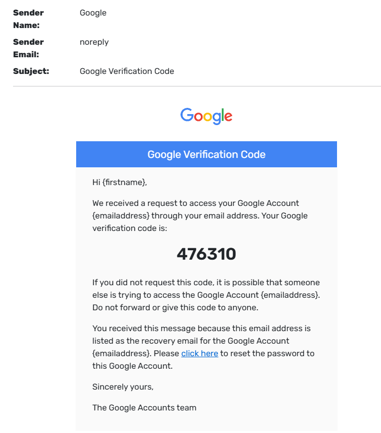
The email may appear to come from a trusted company, such as Microsoft, Google, Amazon, or a financial institution. It often includes official logos and branding that makes it look legitimate.
Warning signs
- Creates a sense of urgency
- Threatens account suspension or closure
- Requests immediate action
- Includes a link directing users to “verify” credentials
- The sender’s address does not match the organization
Cybercriminals rely on a sense of urgency to convince recipients to act before thinking. Legitimate organizations rarely demand immediate action through threating email.
- The Fake Invoice or Payment requests
Businesses and individuals frequently receive emails claiming that an invoice is overdue or that a payment has been procced.
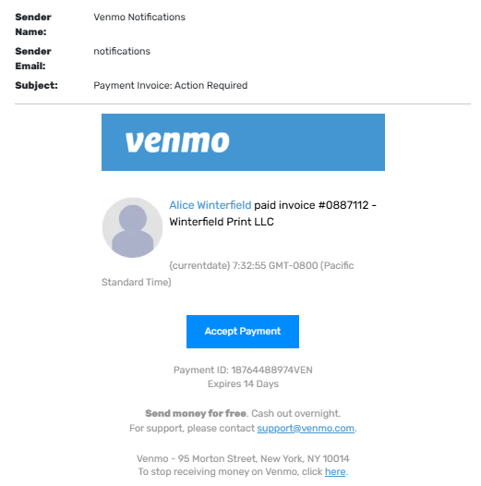
The email may contain an attachment labeled as an invoice, receipt, or billing statement. Opening the attachment can install malware or direct users to a fraudulent website.
Warning signs
- Unexpected invoice or purchase confirmation
- Attachments from unknown senders
- Generic greetings such as “Dear Customer”
- Requests for payment information
- Suspicious file types
Before opening any attachment, verify that you were expecting the document and confirm the sender’s identity through another communication method.
- Don’t miss this one
Some phishing emails offer rewards, prizes, gift cards, or exclusive opportunities.
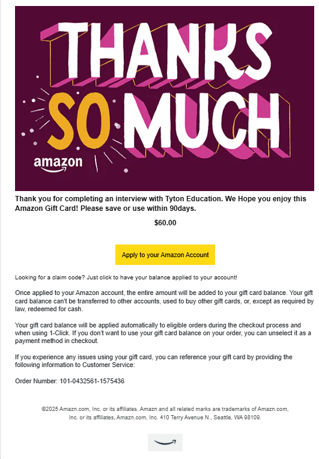
These messages are designed to appeal to excitement rather than fear. Recipients are encouraged to click a link to claim a reward before time runs out.
Warning Signs
- Promises of free money or prizes
- Limited time offers requiring immediate action
- Requests for personal information
- Poor grammar or unusual formatting
- Links that redirect to unfamiliar websites
If an offer seems to be too good to be true, it probably is.
- The close call
Modern phishing attacks can look like nearly identical emails. In many cases, the only difference is a single letter in the sender’s email address or website domain.
For example:
Legitimate Email:
Phishing Email:
At first glance, most users may not notice the difference.
Warning signs
- Slight misspelling in sender addresses
- Minor changes in website URLs
- Unexpected login requests
- Unusual wording from a trusted contact
- Request to bypass normal procedures
This type of attack is especially dangerous because it closely imitates legitimate communications. Always inspect sender information carefully before clicking.
- The Executive or Coworker impersonation scam
Attackers frequently impersonate managers, executives, or coworkers to gain trust.
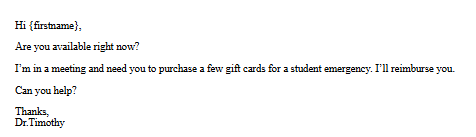
The message may appear to come from a supervisor asking for gift cards, wire transfer, confidential information, or login credentials.
Warning signs
- Unusual requests from leadership
- Request for secrecy
- Pressure to act quickly
- Communication outside normal procedures
- Personal email addresses posing as company accounts
If a request seems unusual, verify it through a phone call, team’s message, or face-to-face conversation before responding.
How to Protect Yourself
Recognizing phishing attempts is only part of staying safe. Consider the following best practices:
- Verify sender email addresses before responding.
- Hover over links before clicking to ensure that the link being used is legitimate.
- Enable multi-factor authentication whenever possible.
- Report suspicious emails to your IT or security team immediately.
- Avoid opening unexpected attachments.
- Stay informed about the latest phishing techniques.
Cybercriminals constantly adapt their methods, making ongoing awareness essential.
Stay Vigilant
The examples above represent only a few of the many phishing tactics used by cyber criminals today. As phishing attacks continue to evolve and become more widespread, particularly with the assistance of AI, security awareness remains one of the strongest defenses against them.
Anyone can become a target, regardless of age, profession, or technical expertise. By learning how to identify suspicious messages and recognize common warning signs, you can significantly reduce the risk of becoming a victim.
Taking a few extra seconds to inspect an email before clicking a link or opening an attachment can prevent costly security incidents and help protect both personal and organizational information.
Want to see CampusGuard’s Phishing Simulator in action? Request a demo to learn more about how you or your organization can help users to recognize and respond to phishing threats before they become a problem. Contact us to get started!